
Why OSPF?
Positives and negatives
OSPF is an interesting choice as an in-neighborhood routing protocol because of its ease of setup (auto convergence, no ASNs), and how ubiquitous it is -- nearly every cheap and expensive commercial and open device supports it. These two positives alone make OSPF worth considering.
On the down-side, it is not specifically designed for an adhoc mesh, it trusts blindly, and has very few tuneables. Additionally, there are a few technical challenges such as the lack of link-local address use, only advertising connected networks (not summaries), and some common defaults on various platforms.
Many of these challenges can be overcome by taking some care to make good choices for options when setting up a network.
OSPF Selection
NYC Mesh has chosen to use OSPF as the standard mesh routing protocol of choice. This may be a controversial choice, as _most_ mesh networks in Europe are using custom mesh routing protocols, or encrypted routing protocols. We have chosen this path because:
- OSPF is an open-standard with implementations on many platforms, open and closed, including cheap older professional switches
- OSPF hugely reduces the burden for installers and members to maintain the network
- OSPF cooperates well with other protocols such as BGP
- Other Mesh networks (CTWUG in South Africa for example) have scaled OSPF to 1000+ routers.
[END OF EXISTING DOC - MB EDITS FOLLOW]
Ok, but why OSPF for NYC Mesh?
NYC Mesh utilizes a wide range of hardware with differing capacities and weather resiliency characteristics. Being volunteer-driven and operated, its important that the network be resilient, but also easy to maintain and scale. OSPF allows us to modify routing tables and plan for expansion without overly-complicated configuration planning.
To standardize across the network, each Hub and node have a Mesh Bridge with default cost of 10 to all adjacent neighbors. This ensure symmetry in link costs on both ends of the link, ensuring bi-directional traffic follows the same path. For each "hop" to an internet exit, each router incurs its link cost to transit to the next hop. By calculating the lowest cost to an internet exit, the local router sends its traffic on to the next hop in the chain.
Example: Node path to internet exit with all default costs
Node A > 10 > Microhub > 10 > Hub > 10 > Supernode > 1 > Public Internet
In the above example, the Node incurs cost 31 to exit to the Public Internet. Absent a lower-cost link becoming available, this will be the route for all internet traffic.
Now that we've standardized route costs, we need to design priority and redundancy to take advantage of nodes clustered around each other while preferring higher-capacity links.
The WDS bridge: ensuring Hub-and-spoke routes are preferred over WDS routes
NYC Mesh uses Omnitik wireless routers at almost all member nodes to automatically connect to each other, providing numerous backup routes in case of hardware failure or network changes, but these connections are often slower and less reliable than point-to-point and point-to-multipoint connections in our Hub-and-Spoke model. To account for this, we put the Omnitik<>Omnitik WDS links on a separate "WDS Bridge" on every Omnitik router with default cost of 100.
Example: Node preferring Mesh Bridge over "shorter" WDS links
Node A > 100 (WDS) > Node B > 10 > Supernode X > 1 > Public Internet
Node A > 10 > Microhub > 10 > Hub > 10 > Supernode Y > 1 > Public Internet
In this example, Node A prefers to exit via Supernode Y as the cost it incurs is 31, versus 111 via Supernode X. If we did not have higher WDS costs, Node A would instead prefer the shorter link to Supernode X, but would very likely experience poorer performance.
For more details on the hybrid Hub-and-Spoke + Mesh model we deploy, see the Mesh page.
Example: Prospect Lefferts Garden
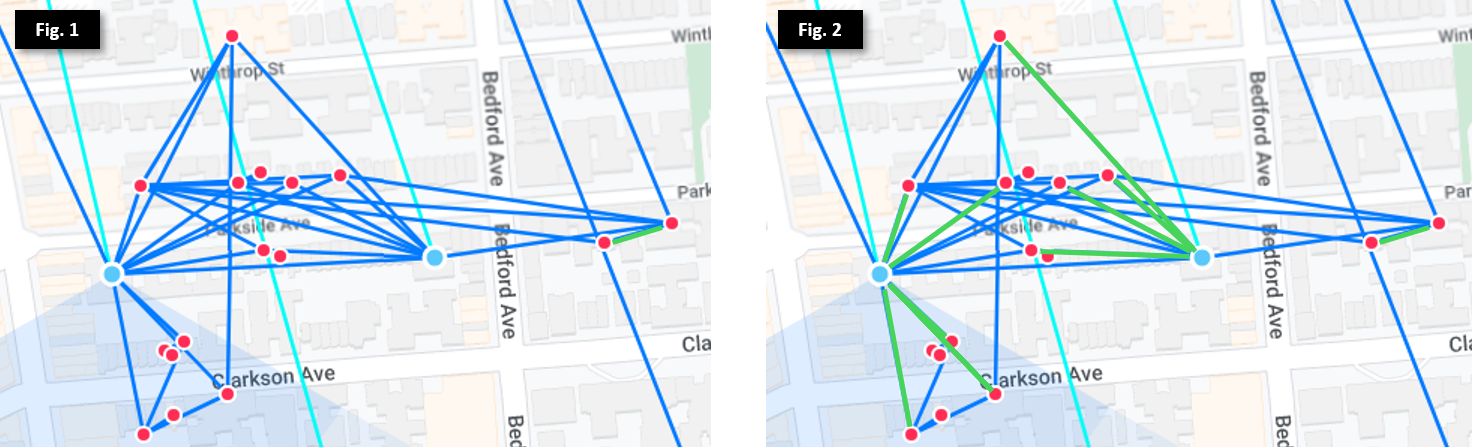
In Figure 1, we see many nodes (marked as red dots) clustered around 2 Microhubs (marked as blue dots) in Prospect Lefferts Garden, as well as multiple exit routes to the north. While most of the nodes will automatically find the best exit, there are some that may have equal costs through multiple exits. To mitigate this, we set preferred routes (via hardware like SXTs, or software with virtual wireless interfaces) on the Mesh Bridge, as illustrated by the green lines in Figure 2. This ensures each node selects its fastest and most stable route to send and receive internet traffic.
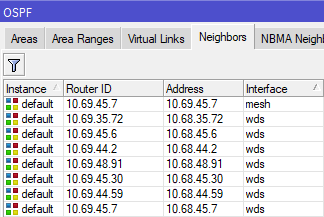
We can see this in action on the Omnitik: 10.69.45.7 is on the the "Mesh" bridge interface, meaning it incurs cost 10 to transit. All other adjacent routers are on the "WDS" bridge interface, and incur cost 100 to transit. This setup ensures the local node prefers the 4507 Microhub as its exit route, but also has backup routes in case 4507 goes offline or one of its upstream links is broken.
By implementing this architecture across all routers on the network, we now have high resiliency to outages, scalability, and minimal configuration effort
Scaling out the Hub-and-Spoke model
This baseline architecture works great in individual neighborhoods and on relatively linear routes, but with over a thousand nodes connecting to 60+ Hubs with links crisscrossing New York City, some planning and manual intervention is required to ensure stability and speed for all connected members.
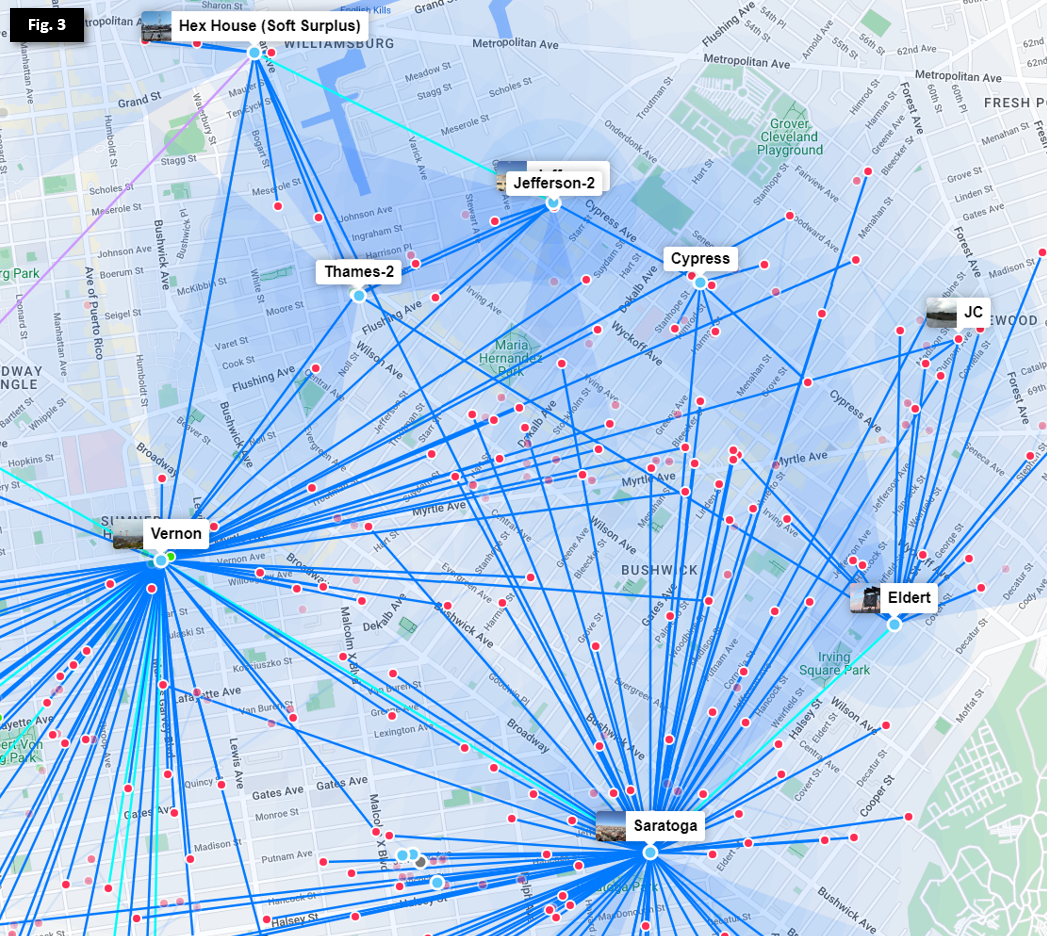
In the Bed-Stuy, Bushwick, Ridgewood, and Crown Heights neighborhoods show above in Figure 3, we have over a dozen Hubs serving hundreds of members. Efficient routing and redundancy across multiple wireless links requires further options for route cost between 10 and 100.
In efforts to minimize single points of failure in our network (hubs having only 1 exit route) and provide dedicated backup routes in cases of weather impacting high-frequency links, we deploy redundant links in a "triangle scheme" so that each hub has multiple low-cost routes to exit. To see this deployed, let's remove the nodes from the above photo and focus on the Hubs.
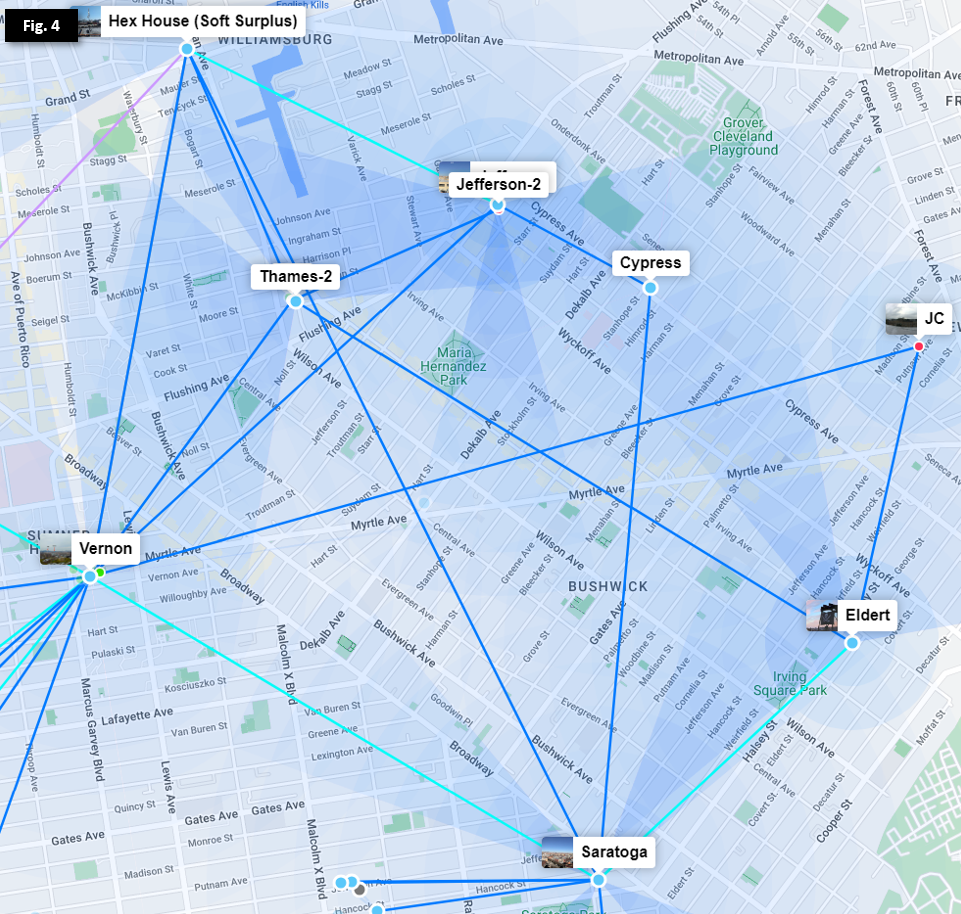
As we can see in Figure 4, each hub has 2 or more exit routes so that any outage of an individual link or Hub will not isolate any other Hub. Additional routes leading off Figure 4 allow multiple exits from both Vernon and Hex House, as well as other lower-capacity links through smaller Microhubs and nodes
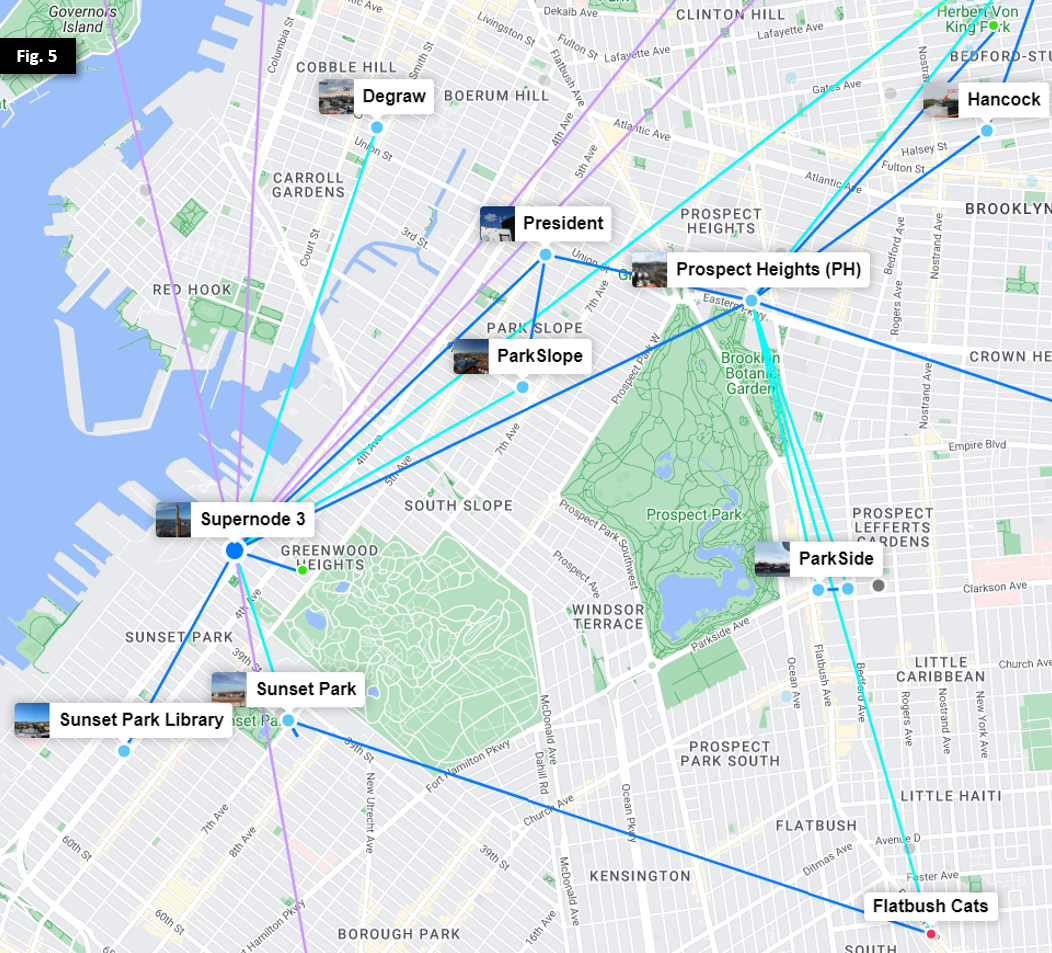
In Figure 5, we observe a similar trend as we move southwest towards Prospect Park and Supernode 3 at Industry City.
Sidebar: The case against OSPF automation and summarization
Given the scale of the problem and continued growth, we must consider an important question: why not implement automation to dynamically adjust OSPF costs based on link quality, and/or utilize summarization and redistribution to simplify planning?
As mentioned above, our network design is meant in part to balance the following three goals:
Further, NYC Mesh has no CEO, directors, or employees, and the board intentionally does not have decision-making authority over non-financial/legal matters; as documented in the NYC Mesh Commons License, the design, planning, maintenance and support of NYC Mesh is done solely by community members and volunteers. While we do have highly-skilled volunteer network engineers, the day-to-day maintenance and monitoring of the network is done by members with varied skill levels; we generally prefer easy-to-maintain solutions over highly customized configurations requiring extensive knowledge and training.
Finally, as we primarily rely on member donations to maintain and expand the network, we generally avoid high-end enterprise-grade hardware or software requiring recurring subscription fees and support contracts to minimize operational expenses. As NYC Mesh continues to grow, we may need to adopt more robust and dynamic routing and load-balancing techniques, and will look to our community to collectively decide on the path forward.
[summary close-out?]
Tying it all together: Load-balancing across varied hardware
NYC Mesh uses a broad range of purchased and donated Ubiquiti and Mikrotik hardware with varying capacity, capabilities, and rain fade resilience, and members are allowed to extend the network at will pursuant to the Network Commons License. Because our OSPF link costs are static and do not automatically increase or decrease based on link quality, limiting ourselves to just two options for link cost will quickly cause issues as the network grows. Here are just a few use cases to consider:
To accomplish this, we need to set up custom link costs on backup routes as well as between high-traffic Hubs.
Example: Microhubs between Major Hubs
Our Vernon and Prospect Heights Hubs collectively carry more than 75% of NYC Mesh network traffic in Brooklyn. By design, each hub's primary exit is through different Supernodes to the public Internet (Vernon through Supernode 10 in Manhattan, and Prospect Heights through Supernode 3 in Industry City). To allow redundancy between their exits, a dedicated 60GHz link (in teal) is deployed between the two, but Vernon and Prospect Heights also hav more preferrable secondary links (illustrated further below in Figure 7). This requires the link to have a slightly higher cost (in this case, 15) so that each Hub prefers other backup routes in case of primary exit link outages.
To make matters more complicated, Microhubs in between Vernon and Prospect Heights connect to both Hubs to provide their own redundancy, as illustrated in Figure 6.
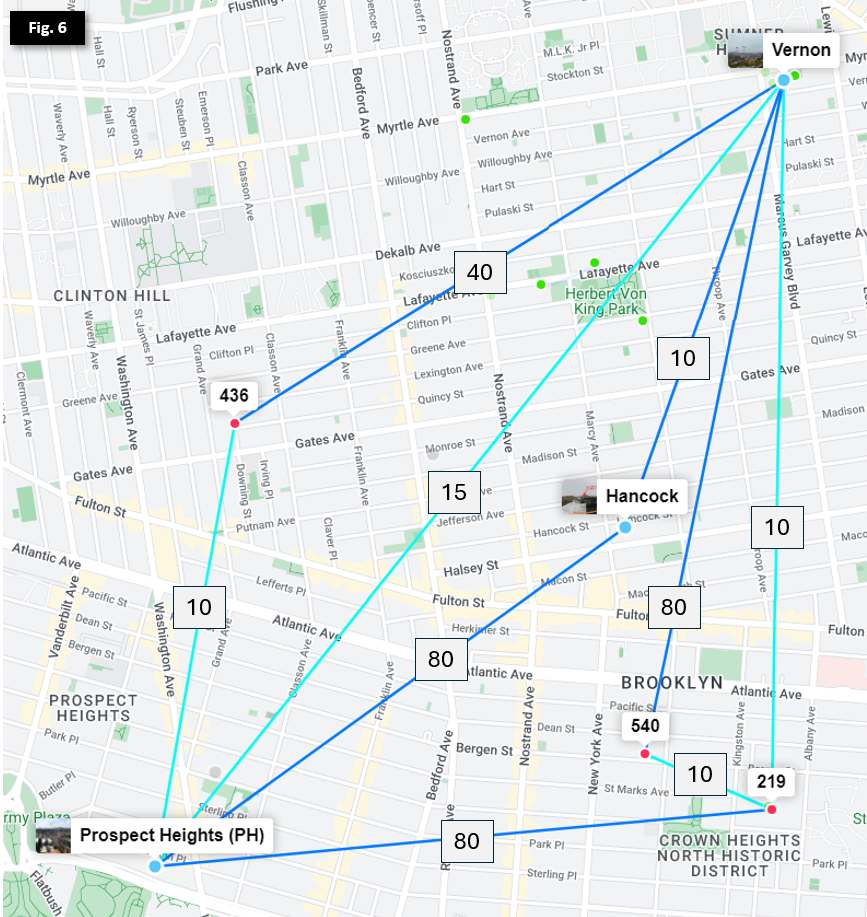 Note: nodes and sector coverage have been omitted
To ensure each Microhub prefers the fastest route and they don't bridge Vernon and Prospect Heights by having additive link costs lower than the Vernon <> Prospect Heights 60GHz link, we need to manually set the backup links with higher costs.
Determining link costs
Note that there is no firm methodology or formula for calculating optimal custom link costs in this model, though backup links are generally set between 20 and 80 depending on upstream impacts. Sufficient buffer is allocated between primary and secondary routes to allow expansion and updates with minimal changes required to upstream OSPF costs or routes. When selecting a custom link cost that bridges segments of the network, the following factors should be taken into account:
That's a lot of factors to consider! Let's see what this looks like in the real world.
Example: Determining Primary, Secondary, and Tertiary costs
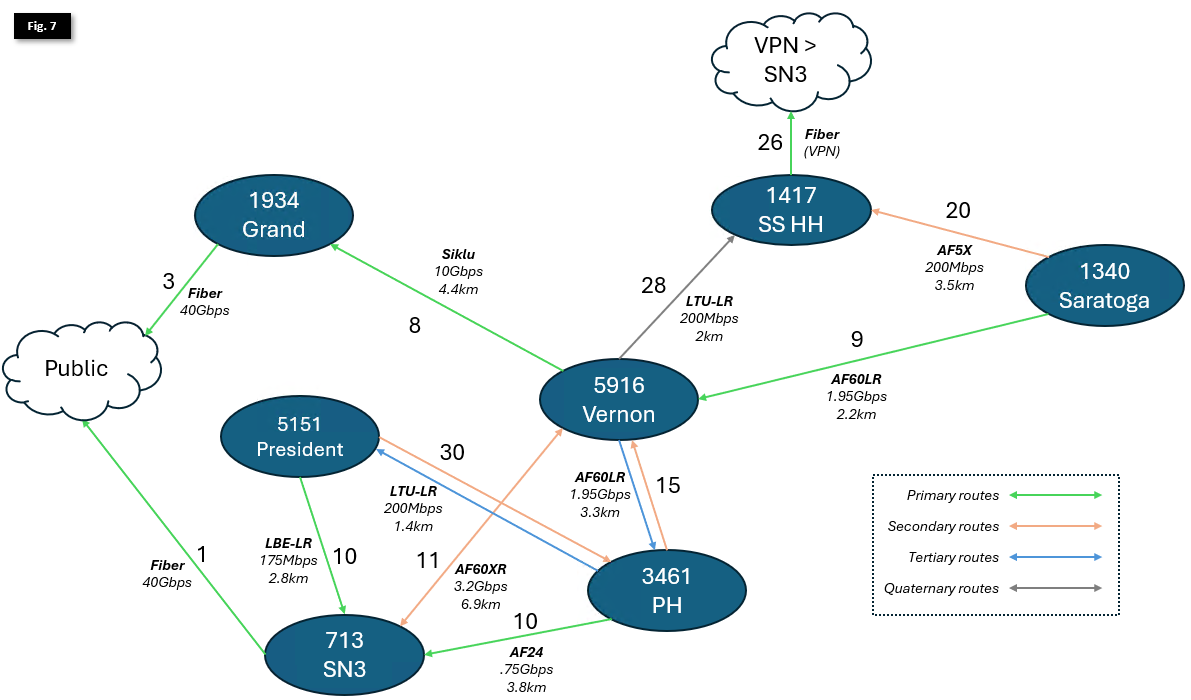 Note: some additional links and hubs omitted for clarity; distances between Hubs are not to scale
Figure 7 illustrates primary, secondary, and tertiary routes for larger Hubs in Brooklyn.
As we can see, deciding on primary routes depends on both capacity of individual links, as well link distance and count of hops to an internet exit.
Let's start by identifying internet exits:
Next, let's look at 1340 - Saratoga
Moving south now to 3461 - Prospect Heights:
To the West we look at 5151- President
Finally, let's look at 5916 - Vernon
Last topic - Outage Planning
Ok, in summary, we've done the following:
How did that all come together, and how do we select the right balance of capacity and weather resilience? Let's look at Figure 7 one more time.
[keep going]